everHome Community
Welcome to the everHome community!
The community consists of different areas in which everHome users can exchange information with each other. You're sure to find some useful information here. The everHome team is also happy to stop by here, clarify questions and take up your suggestions.
Ecotracker Integration über Hacs möglich Version 1.0.5 stefanseeger
Benutzer 32983
Member
Posts: 1
Registered: 14.09.2023 um 14:23
Ecotracker Home Assistant Integration
Give me a tip: paypal.me/StefanSeeger
Custom integration for Ecotracker energy monitoring device. It directly accessed the local HTTP server.
Installation
Prerequisites
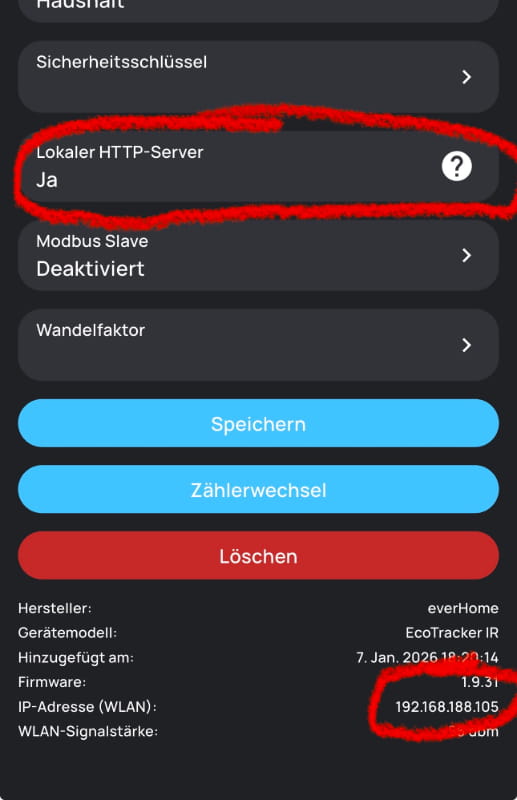
- Make sure your ecotracker is reachable in the local network via (http://your.local.ip.address/v1/json).
- If not, please activate the "Local http server" of your Ecotacker device
HACS (Recommended)
- Add this repository as a custom repository in HACS:
- Go to HACS > Integrations
- Click the three dots in the top right
- Select "Custom repositories"
- Add the repository URL and select "Integration" as the category
- Click "Install"
- Restart Home Assistant
Manual Installation
- Copy the
custom_components/ecotrackerfolder to your Home Assistant'scustom_componentsdirectory - Restart Home Assistant
Configuration
- Go to Settings > Devices & Services
- Click "+ Add Integration"
- Search for "Ecotracker"
- Enter your device's IP address
- Set the polling interval (default: 60 seconds, range: 1-86400 seconds)
Changing Settings
To change the polling interval after setup:
- Go to Settings > Devices & Services
- Find your Ecotracker device
- Click "Configure"
- Update the polling interval and IP address as needed
Features
- Configurable polling interval (1-86400 seconds, default: 60 seconds)
- Multiple sensors:
- Power (W)
- Power average (last minute)
- Power phase 1 (optional)
- Power phase 2 (optional)
- Power phase 3 (optional)
- Energy In (kWh)
- Energy Out (kWh)
- Compatible with Home Assistant Energy Dashboard
- Config flow UI for easy setup
- Options flow for changing settings without re-adding the integration
Sensors
sensor.ecotracker_power- Current power consumption in Wattssensor.ecotracker_power_phase_1- Power consumption of phase 1 in Watts (optional)sensor.ecotracker_power_phase_2- Power consumption of phase 2 in Watts (optional)sensor.ecotracker_power_phase_3- Power consumption of phase 3 in Watts (optional)sensor.ecotracker_power_average- Average power consumption (last minute)sensor.ecotracker_energy_in- Total energy imported in Watt-hourssensor.ecotracker_energy_out- Total energy exported in Watt-hours
xxxxxxxxxxxxxxxxxxxxxxxxxxxxxxxxxxxxxxxxxxxxxxxxxxxxxxxxxxxxxxx
Ich habe so meine Ecotracker bequem ins HA eingebunden.